Condition Node
The Condition node routes your flow with rules you define. You add one or more comparison rules — like "is the order total greater than 100?" or "does the message contain the word refund?" — and the flow takes the branch of the first rule that matches, or a final Else branch if none do. Use it when you can express the decision as a concrete comparison. For decisions that need the AI to interpret meaning, use the Condition Agent node instead.
Adding it to a flow
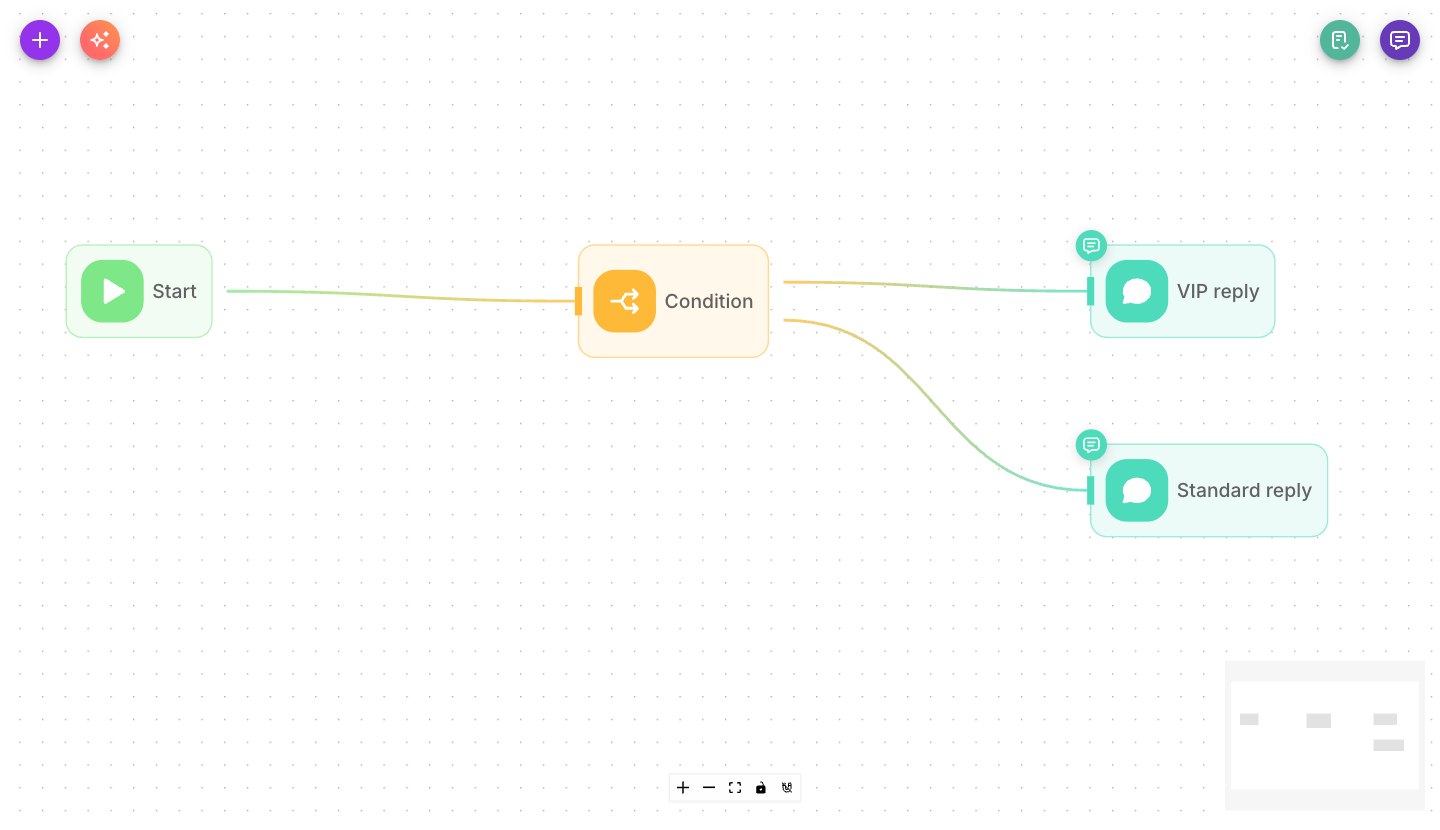
Drag a Condition node onto the canvas and connect the previous node to it. Then define one or more comparison rules. The node grows one output handle per rule, plus a final Else handle for runs where no rule matches — so N rules give you N+1 handles.
Inputs
| Parameter | Description | Required |
|---|---|---|
| Conditions | One or more comparison rules, evaluated top to bottom. Each rule has a Type (String, Number, or Boolean), a first value, an operation, and a second value to compare against. The flow follows the branch of the first rule that matches; if none match, it takes the Else branch. | Yes |
| Show Output in Chat | Whether this node's output appears in the chat history. Off by default. | No |
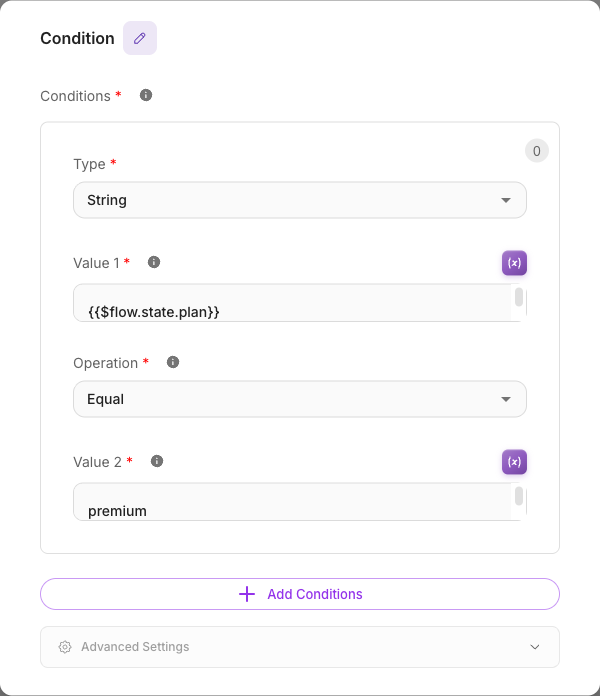
Each condition rule is built from:
- Type — the kind of values you're comparing: String, Number, or Boolean.
- Value 1 — the value to test, usually a variable like
{{$flow.state.total}}or{{$question}}. - Operation — the comparison. For strings: Contains, Ends With, Equal, Not Contains, Not Equal, Regex, Starts With, Is Empty, Not Empty. For numbers: Smaller, Smaller Equal, Equal, Not Equal, Larger, Larger Equal, Is Empty, Not Empty.
- Value 2 — the value to compare against (hidden for Is Empty / Not Empty).
Outputs & branching
The Condition node is a multi-output node with dynamic branches — it creates one output handle per rule, plus a trailing Else handle. The per-rule handles are numbered 0, 1, 2… in the order you list the rules; the Else handle is always last and always present. Add a rule and a new numbered handle appears before Else; remove one and it disappears. So N rules produce N+1 handles — this is not a fixed True/False split.
| Handle | When the flow takes it |
|---|---|
0 (first rule) | The first rule is true. |
1 (second rule) | The first rule was false and the second is true. |
| … | … |
Else (always last) | No rule matched. |
Evaluation is first-match-wins. Flowera checks your rules top to bottom and stops at the first one that is true — the flow takes that rule's branch and the remaining rules are never checked. If no rule is true, the flow takes Else. This behaves exactly like an if / else-if / … / else chain, so rule order matters: put your most specific rules first.
How edges pick a branch: draw one edge from each handle to the node that should run in that case. Because only the first matching rule fires, each branch is mutually exclusive — a single run takes exactly one path.
You can add or remove rules after the branches are wired. Removing a rule removes that rule's connections. Every other connection stays with its own rule, and Else keeps its connection, even though the handles below it are renumbered. Adding a rule gives the new rule an unconnected handle, and Else keeps its connection.
The node a removed rule pointed to stays on the canvas, now with nothing connected to it. It never runs, and the flow keeps working without it. Delete it if you don't need it, or connect it somewhere else.
Else handleElse is where every non-matching run goes. If you leave it unconnected, a message that matches none of your rules simply stops at the Condition node with nowhere to go — and the customer gets no reply.
Example
Route customers by cart value with two rules:
- Type: Number · Value 1:
{{$flow.state.total}}· Operation: Larger · Value 2:100 - Type: Number · Value 1:
{{$flow.state.total}}· Operation: Larger · Value 2:0
This gives three handles: 0 (cart over 100), 1 (cart 1–100), and Else (empty or zero cart). Because the first matching rule wins, a cart of 150 takes branch 0 — even though it also satisfies rule 2 — so rule order is what makes the tiers work. Wire branch 0 to an Agent that offers free shipping, branch 1 to a standard checkout reply, and Else to a "your cart is empty" message.
Tips
- Rules are checked top to bottom, first match wins — order them from most specific to most general.
- Always connect the
Elsehandle so non-matching runs have somewhere to go. - Choose the right Type — comparing numbers as strings can give surprising results (for example, "9" is "larger" than "100" as text).
- Use Is Empty / Not Empty to check whether a value was captured before continuing.
- For fuzzy, meaning-based routing ("is the user frustrated?"), use the Condition Agent instead.
Related
- Condition Agent node — AI-driven, scenario-based branching
- Filter node — a fixed True/False pass-or-block node
- Variables
- Flow state