Flow State
Flow state is your flow's memory for facts — named values that travel through a run and, when you want, persist across the whole conversation. It's how a bot remembers the customer's name after they tell you, so a later step can greet them by it.
{{$flow.state.name}}
{{$flow.state.orderId}}
Defining state
You set up state keys on the Start node under Flow Variables — a simple list of Key / Value pairs. The key is the name you'll read later; the value is an optional starting value.
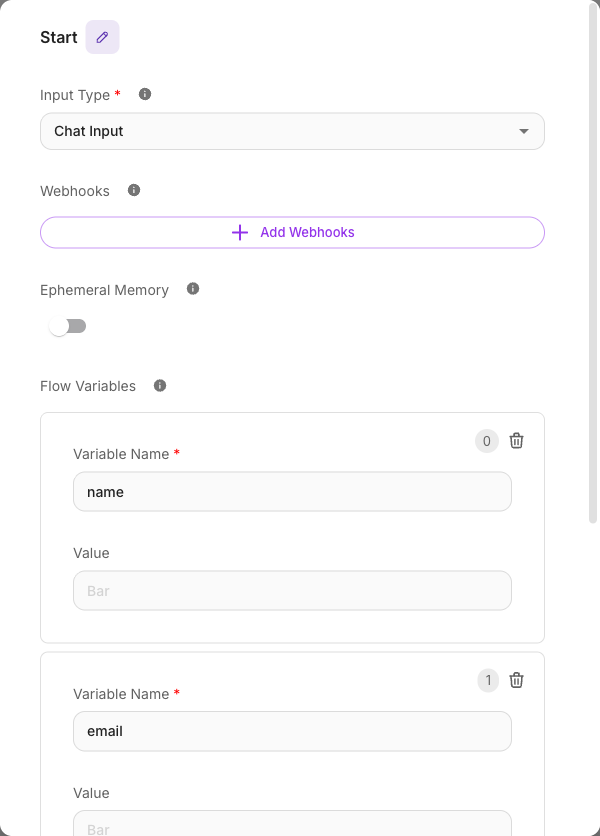
You don't have to predefine every key — nodes can create and update state keys as the flow runs — but listing the keys you expect on the Start node makes them easy to discover and gives them starting values.
Updating state during a run
As a turn runs, nodes can write to state. The typical way is an Update State step on a node: you name a key and give it a value, often pulled from another variable. For example, after an AI node extracts the customer's name, you save it:
Key:   name
Value: {{ Extract Info.name }}
From that point on, any later node can read {{$flow.state.name}}.
Reading state
Anywhere a field accepts variables, read a state value with {{$flow.state.<key>}}:
Thanks, {{$flow.state.name}}! I've pulled up order {{$flow.state.orderId}}.
Persist vs. Ephemeral — does state survive to the next message?
Two Start-node settings control how long things last:
- Persist Variables (on by default) — flow state carries over from one turn to the next within the same conversation. Save the customer's name this message, and it's still there next message. Turn this off and state is wiped after each turn.
- Ephemeral Memory — this controls conversation history, not flow state. When on, each run starts fresh with no past chat history. It's about what the AI "remembers" of the dialogue, separate from your saved state values.
The two are independent. Most lead-collecting and multi-step flows want Persist Variables on so values accumulate across the conversation. See Memory for how these two settings work together.
Flow state persists per conversation (session), not globally. Each customer's conversation has its own state — one customer's saved name never leaks into another's.
State automatically becomes a Lead
Here's a powerful behavior worth understanding: whenever your flow's state updates, Flowera saves it as a Lead. You don't wire anything up — naming your state keys well is all it takes.
Each conversation gets one Lead (matched by session). As state changes, that Lead is kept up to date. The rules for where each value lands:
name,email, andphone(matched case-insensitively —Name,EMAIL,Phoneall count) map to the Lead's own Name, Email, and Phone columns.- Every other state key you define goes into the Lead's custom fields, shown alongside the standard columns in View Leads.
So if your flow saves name, email, and interest, you get a Lead with its Name and Email columns filled in and interest as a custom field.
This also covers values that arrive with the trigger rather than being set by a node — a webhook's payload mapping (for example a CRM pushing name, phone and campaign into $flow.state), the Override Config of an Execute Flow node, or flowState sent through the API. Those are saved to the Lead as soon as the run starts, so the Lead is filled in even if the customer never replies. Two rules apply: the key must be declared in the Start node's Flow State list (name, email and phone always count, declared or not), and empty values are skipped, so a trigger can't blank out something an earlier run already saved. Channel details Flowera adds on its own (such as platform or ad attribution) are not saved unless you declare that key yourself. Those two rules are what keeps the Lead clean no matter where the value came from — a webhook, an Execute Flow call or the public API all go through them. Campaign sends work the same way: when the recipient list comes from an uploaded CSV, everything you map is saved to that recipient's Lead; when it comes from a saved lead filter, your mapped custom fields are saved but name, email and phone are left as they are, so a list prepared hours earlier can't overwrite a contact detail that changed since.
Keys that are never saved as custom fields
Flowera skips a set of internal/system keys — they're never written as custom fields even if they appear in state:
question, source, webhook, whatsappEventType, instagramEventType, facebookEventType, schedule, persistState, ephemeralMemory, form, chatHistory, uploads, sessionId, chatId, chatflowId, workspaceId, executionId, apiMessageId, overrideConfig, sessionLabels
These are reserved for Flowera's own use, so avoid naming your own state keys after them — a value stored under one of these names won't reach your Lead.
Collecting contact details? Name your state keys exactly name, email, and phone. They'll drop straight into the Lead's standard columns instead of ending up as custom fields. This is the heart of the Lead collector bot tutorial.