Structured Output
Normally an AI node replies with free-form text. Structured output makes it return clean, named fields instead — like name, email, and intent — so later nodes can use each value precisely. It's the reliable way to get an AI node to "fill in a form" you can act on.
What it does
Instead of a paragraph you'd have to parse, a structured-output node produces distinct fields you define. Structured output is a setting on the LLM node. For example, given a customer message, an LLM node can return:
name    → "Ali Yılmaz"
email   → "ali@example.com"
intent  → "refund_request"
Each field becomes its own variable you can read in a later step — write it to flow state, branch on it in a Condition, or drop it into a reply.
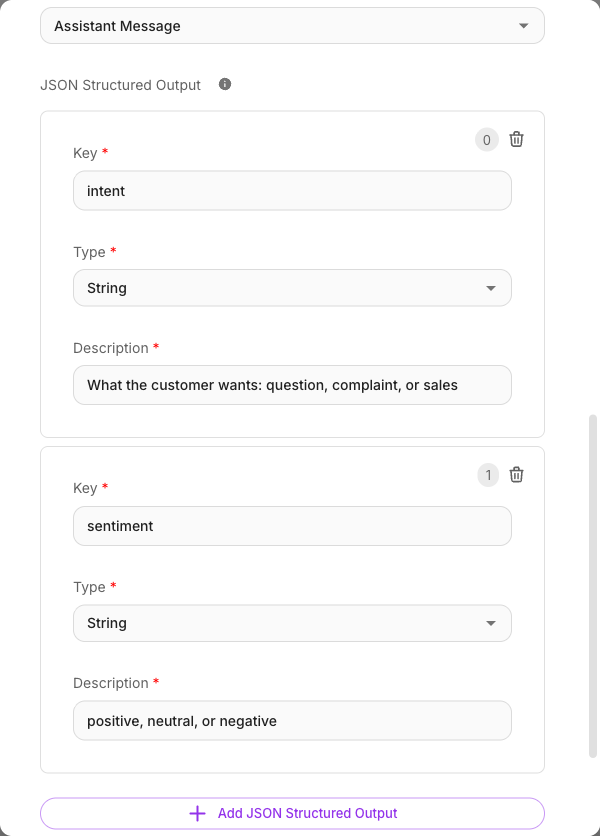
Setting it up
On an LLM node, enable structured output and define your fields — a name and a type for each (text, number, and so on). When the node runs, the AI is guided to return exactly those fields.
Keep field names short and descriptive (name, orderId, sentiment). You'll use these names to reference the values.
Structured output lives on the LLM node only. An Agent node produces free-form text plus any tool calls, not a fixed schema. To get structured data out of an agent, follow it with an LLM node whose structured output extracts the fields you need from the agent's reply.
Reading the fields
There are two ways to reference a structured field, depending on where you are.
From a later node (cross-node) — use the source node's label plus the field name:
{{ Extract Info.name }}
{{ Extract Info.email }}
From inside the same node (self-reference — for example in that node's own Update State) — use output:
{{ output.name }}
{{ output.email }}
Both resolve at run time. The palette and {{ autocomplete list these fields for you automatically once the schema is defined.
{{ Extract Info.name }} matches the node label character-for-character, including case. {{ extract info.name }} resolves to nothing and the raw text is sent as-is. The label without a field ({{ Extract Info }}) is matched case-insensitively, so it keeps working — which is exactly what makes the dotted form's stricter rule easy to miss. Let the autocomplete insert the label rather than typing it.
The {{output.x}} footgun
{{ output.<field> }} means "a field from this node's own structured output." It's meant for referencing a node's result from within that same node (its Update State, for instance).
output is self-only{{ output.name }} refers to the current node's structured output — not some earlier node's. If you want a field from a different node, you must use that node's label: {{ Extract Info.name }}. Using a bare {{ output.name }} where you actually meant an upstream node's field resolves to the wrong node (or nothing), and it's an easy mistake to make when copying a field reference between nodes.
A reliable pattern that avoids the trap:
- Give the AI node structured output fields (
name,email). - In that same node's Update State, save them to flow state using
{{ output.name }}and{{ output.email }}. - In every later node, read the stable values from state:
{{$flow.state.name}}.
Routing everything through flow state means later nodes never depend on output at all — they read $flow.state.*, which is unambiguous.
When the model cannot be reached
Structured output fails loudly, and that is deliberate.
Every other AI node degrades gracefully when a provider is unreachable: after the retries and model fallbacks are exhausted, the node answers with a short apology sentence so the conversation keeps moving. A node with structured output does not. It ends the execution with an error instead.
The reason is what the alternative would look like. An apology sentence is prose, and your schema
promised fields. The node would return room_condition: undefined while reporting success, the
branch after it would take the wrong path, and any node that writes to a database would store a row
that looks complete and contains nothing. On an evidence document — an inspection report, a signed
form, a record someone later relies on — a blank that reads as real is far worse than a failure
somebody has to look at.
So when you see an execution fail on a structured-output node:
- The error message names the underlying cause (
503, an invalid key, a timeout), not just "the model failed". Read it before retrying. - Nothing partial was written. There is no half-filled row to clean up.
- Retrying is safe. The failure is usually a transient provider outage, and the platform already tried several models before giving up.
If you would rather have the apology sentence than the error — for a node whose output is only ever shown to a person, never stored or branched on — remove the structured output fields from it and parse the text yourself.