Choosing a Model
The "thinking" nodes — LLM, Agent, Condition Agent, and Human Input — each run on an AI model from a provider like OpenAI or Google. This page explains how to pick one, how credentials work, and gives plain-language guidance on which model fits which job.
Picking a model on a node
Open a thinking node and choose:
- A provider — for example OpenAI or Google (Gemini).
- A model — the specific model within that provider (e.g.
gpt-4.1-mini,gemini-2.5-flash).
Each node in your flow can use a different model. It's common — and cost-effective — to run a cheap, fast model for simple routing and a stronger model only where quality really matters.
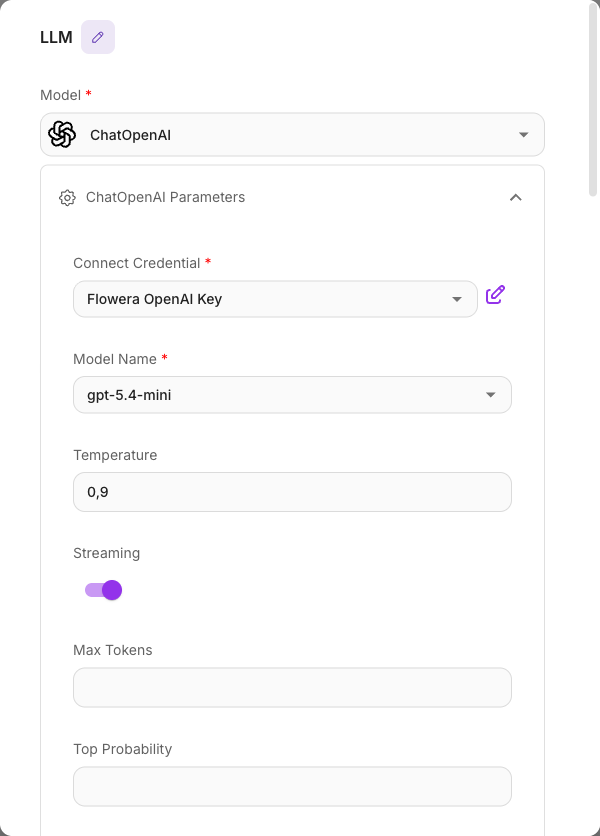
Credentials and platform default keys
To call a provider, Flowera needs an API key for it. There are two ways this is satisfied:
- A platform default key — for some providers Flowera already has a shared key available, so you can select a model and it just works, no setup.
- Your own credential — you can add your own provider API key as a credential in your workspace and attach it to a node. Use this to bill usage to your own provider account or to access models the platform default doesn't cover.
If a provider has neither a platform default nor a credential you've added, its models can't run until you add one. When a node saves without a working model you'll see a "Model is required" style error — pick the provider and model again and make sure a credential (or platform default) is attached.
Track what your flows are spending in the usage dashboard. Model costs vary enormously — a flagship model can cost 20–30× more per message than a small one for similar quality on simple tasks.
Which model should I use?
You don't need to memorize benchmarks. Match the model's class to the job:
- Small / "nano" / "lite" models (e.g.
gpt-5.4-nano,gpt-5.6-luna,gemini-2.5-flash-lite) — cheapest and fastest. Great for simple chat, FAQ, classification, routing, and data extraction. They also tend to stick to the facts well on grounded tasks. - Mid-tier / "mini" / "flash" models (e.g.
gpt-4.1-mini,gemini-2.5-flash,gemini-3-flash) — the everyday workhorses. A strong default for customer support and most conversational bots: good quality, still affordable and quick. - Flagship models (e.g.
gpt-5.6-sol,gpt-5.4,gemini-3.1-pro,gemini-2.5-pro) — the most capable and the most expensive. Reserve them for hard reasoning, careful document analysis, and complex multi-step work. - Deep-reasoning use (any GPT-5.x / GPT-6 model with Reasoning Effort raised) — for math, coding, and step-by-step problem solving. Avoid it for answering from your own documents — heavy reasoning tends to drift from the source more than standard use.
Quick picks by task
| Your task | Good choice |
|---|---|
| Simple chatbot / FAQ | gpt-5.4-nano, gpt-5.6-luna, or gemini-2.5-flash-lite |
| Customer support | gpt-4.1-mini or gemini-2.5-flash |
| Answering from your documents (best value) | gpt-4.1-mini or gemini-2.5-flash |
| Answering from your documents (best faithfulness) | gpt-5.4-nano or gemini-2.5-flash-lite |
| Data extraction / structured output | gpt-5.4-nano or gemini-2.5-flash |
| Classification / routing | a nano/lite model |
| Document analysis / hard reasoning | gpt-5.4 or gemini-3.1-pro |
| Complex math / coding | a flagship model at higher Reasoning Effort, or gemini-3-flash at higher effort |
On GPT-5.6 and GPT-6, an Agent that uses custom (function) tools only runs at Reasoning Effort None (with the OpenAI provider this also applies to GPT-5.5, and GPT-5.4 runs such an Agent at None). Reasoning Effort only applies while the Reasoning option is on.
Temperature (creativity)
Some models let you set a temperature — lower means more focused and consistent, higher means more varied and creative.
| Use case | Temperature |
|---|---|
| Data extraction, JSON, factual lookups | 0.0 – 0.2 |
| Customer support | 0.3 – 0.5 |
| Creative writing | 0.8 – 1.2 |
Newer reasoning models often hide the temperature control (it doesn't apply to them). If you don't see it, the model manages this internally — that's expected.
A few things to avoid
- Using a flagship model for simple FAQ. A nano model can cost dramatically less for the same quality on easy questions.
- Using deep reasoning (a raised Reasoning Effort) to answer from documents. Reasoning-heavy setups hallucinate more on grounded tasks than standard ones — keep it for math and code.
- Stuffing huge amounts of text into the prompt. Focused, relevant context beats a giant context window; quality drops as you pile on more.
The Agent node's built-in web search, code interpreter, and image generation tools only run on an OpenAI chat model. If you select a non-OpenAI model and configure these, they're skipped at run time. To get the same capabilities elsewhere, use that provider's native equivalents. See the Agent node.