Pricing
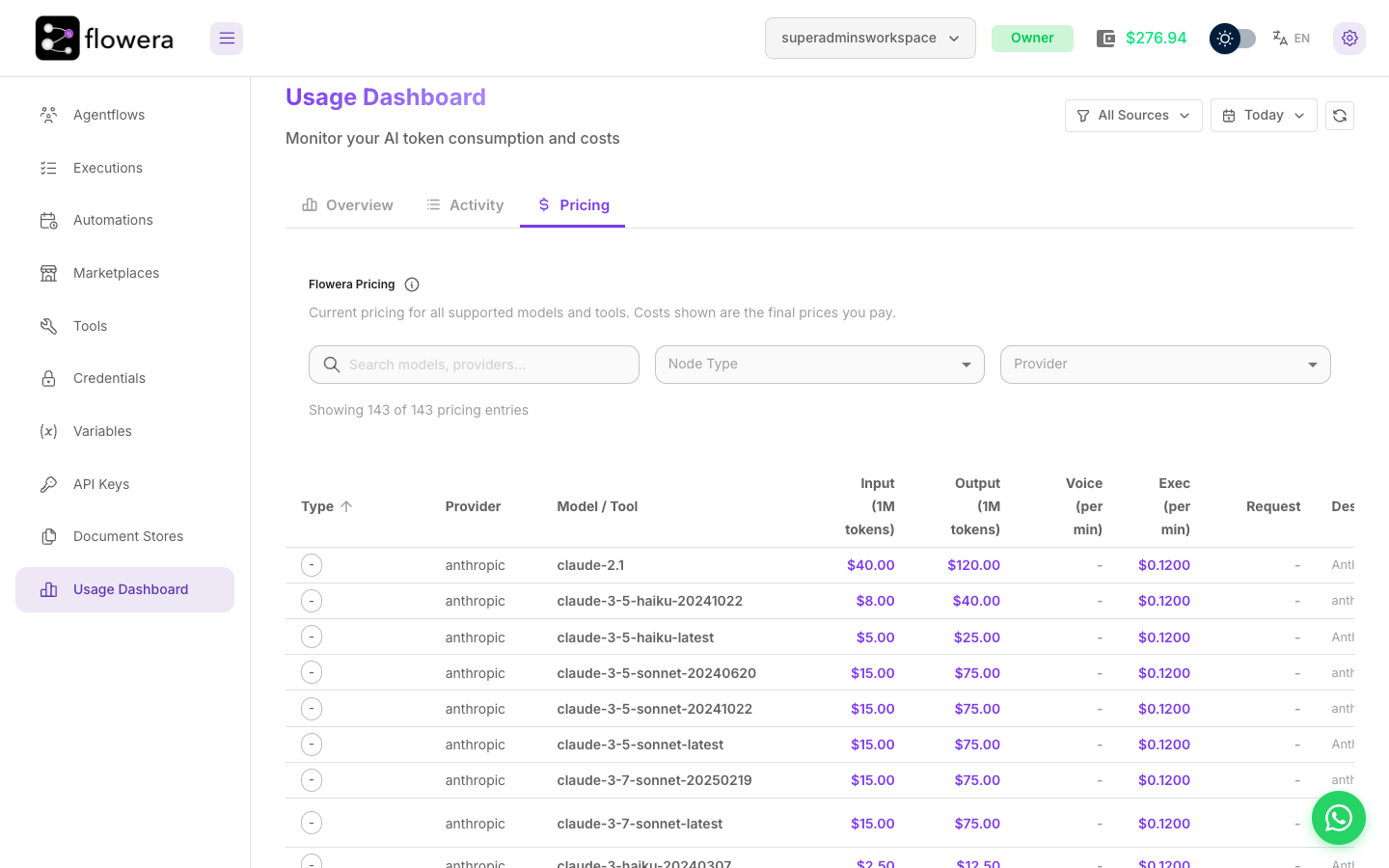
AI models and paid built-in tools are metered at a published rate; every other node and tool pays a fixed fee each time it runs. You can read both inside the product: Usage Dashboard → Pricing.
Fixed fees
Every node and tool that isn't an AI model or a paid built-in tool pays a fixed fee per run. The Fixed fees card at the top of the Pricing tab lists them:
| What runs | Price |
|---|---|
| Any other node or tool — Condition, Filter, HTTP, Custom Function, Direct Reply, Wait, Google Sheets, Gmail, Custom Tool, HTTP request tools … | $0.001 |
| A WhatsApp, Instagram or Facebook message | $0.001 |
| A WhatsApp template message | $0.01 |
| A WhatsApp flow message — also when an Agent sends it | $0.01 |
| PDF generation | $0.01 |
There is no token, request or per-second charge on top. The one addition: a fixed-fee node that
runs for a long time pays $0.001 for each full 30 seconds it runs. A 20-second HTTP call costs
$0.001, a 40-second one $0.002, and a two-and-a-half-minute one $0.006. A Wait node, a tool called by an Agent,
and a tool that runs another flow or agent (Agent as Tool, Chatflow Tool, Chain Tool) never pay this
step — the other run's nodes are billed on their own.
How to read the price table
The table below the fixed fees lists only what is metered: AI models and paid built-in tools (OpenAI web search, image generation, code interpreter, Google Custom Search). It has one row per model or tool, and the columns are the different ways something can be charged:
| Column | Unit | Applies to |
|---|---|---|
| Input | Per 1M tokens | Text sent to the model |
| Output | Per 1M tokens | Text the model generates |
| Voice | Per minute | Speech-to-text and text-to-speech |
| Exec | Per minute | Wall-clock time the node runs |
| Request | Per call | Tools charged per invocation rather than per token |
A dash means that column doesn't apply — most chat models have no voice rate, most tools have no token rate.
Search by model or provider, and filter by Node Type or Provider, to find the row you care about. The counter above the table tells you how many entries match.
Making sense of the numbers
Per-million-token prices are hard to feel. A rough translation:
- A typical support exchange — a system prompt, a few turns of history, a retrieved passage, and a short reply — is on the order of 2,000 input and 200 output tokens.
- At
$4.00per 1M input and$16.00per 1M output — the rate forgpt-4.1-mini— that's about $0.011 per message. - At
$75/$375— the rate for a flagship likeclaude-opus-4-1— the same exchange is about $0.23, roughly 20× more.
The rates in the Pricing tab are the rates you are charged. There is no markup to add on top and no separate provider bill.
Neither is expensive on its own. The difference shows up at ten thousand messages a month, which is why choosing the right model per node is the single most effective cost decision you make.
Which node produces which cost
| Node | Charges |
|---|---|
| LLM, Agent, Condition Agent | Input and output tokens, plus execution time |
| Retriever | Embedding tokens for the query, plus execution time |
| Speech-to-text, follow-up prompts, document store embeddings | Their metered rate (per minute of audio, or per token), plus execution time |
| Paid built-in tools — OpenAI web search, image generation, code interpreter, Google Custom Search | Their metered rate (tokens or per request), plus execution time |
| Tool or an Agent's tool sending a WhatsApp template or flow message, or generating a PDF | $0.01 |
| Tool or an Agent's tool sending a normal WhatsApp, Instagram or Facebook message | $0.001 |
| Condition, Filter, HTTP, Custom Function, Direct Reply, and any other tool | $0.001, plus $0.001 per full 30 seconds |
| Wait | $0.001 flat — the wait duration itself is free |
| Human Input | Nothing — it records no usage of its own |
Only AI nodes and paid tools are metered by execution time, per
second. Fixed-fee nodes pay the 30-second step instead, so a quick Condition or Direct Reply costs
exactly $0.001, however many of them a flow has.
When an Agent calls a tool, the Agent's own execution time already covers the time the tool takes. The tool pays its fee or its metered rate, but never time on top.
Why the same model differs by provider
The same model name can appear under more than one provider — through Azure, through an aggregator like OpenRouter, or direct. Each has its own row because each charges differently. Where a model appears more than once, check which provider your node is actually set to.
Using your own provider key
You can attach your own provider credential to a node — for a model Flowera doesn't hold a key for, for a rate you've negotiated directly, or to keep usage on your own provider account for your own reporting.
Flowera meters token usage from the model's response, not from whose key produced it. With your own credential attached you are billed twice: once by your provider, and once from your Flowera wallet at the rate in the Pricing tab. Bring your own key when you need the account, not to save money.
How prices are updated
Prices change only when the app is redeployed. Metered rates come from the seed CSV and fixed fees from the price list built into the app; the product and the Pricing tab read the same sources, so there is no separate price list that can drift out of sync — and no price can change while the app is running.
The Pricing tab is always the authoritative version for your installation. If a number here and a number there ever disagree, the product is right.
Related
- Choosing a model — matching model class to job
- Execution time — the charge that isn't tokens
- Usage Dashboard — what you actually spent