Send a Delayed Follow-up
Some of the best bot moments happen after the conversation pauses — a gentle nudge a few minutes later: "Still thinking it over? Here's a 10% code." In this tutorial you'll use the Wait node to pause the flow, and flow state to remember what you already know, so the follow-up is timely and personal.
What you'll build: a bot that greets a visitor, waits a set period, then sends a personalized follow-up message.
Nodes you'll use:
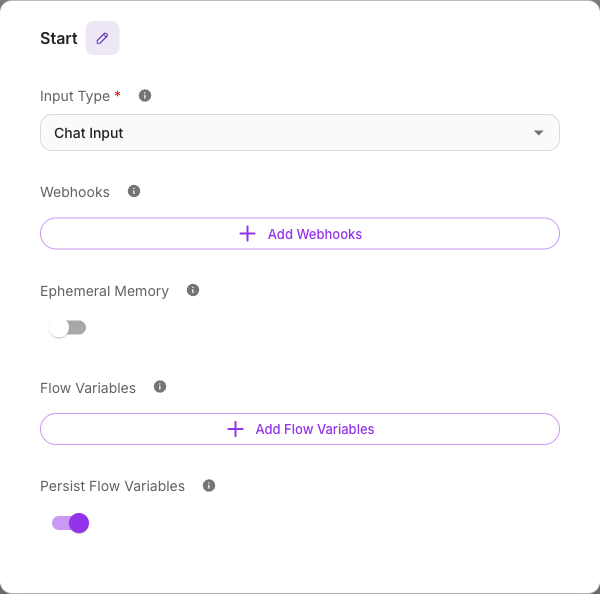
- Start — Chat Input, with Persist Variables on
- Agent — greet and capture context
- Wait — pause the flow
- Direct Reply — send the follow-up
Concepts to know:
- Flow state — remembering context across the pause
- Memory — persistence across turns
Why state matters here
A pause can span minutes or hours. For the follow-up to reference what the visitor said, that information has to survive the wait. That's exactly what flow state with Persist Variables does: values you save before the Wait are still there when the flow resumes.
If Persist Variables is off, state won't reliably survive a long pause and your follow-up will have nothing to personalize with. Keep it on for delayed flows.
Step 1 — Set up the Start node
Create a new AgentFlow. On the Start node:
- Set Input Type to Chat Input.
- Keep Persist Variables on.
- Under Flow Variables, add a key to hold the context you'll follow up on — for example
topic(what the visitor was interested in).
Step 2 — Greet and capture context
Add an Agent node and connect the Start node to it, and rename it Answer + save topic so its job is obvious on the canvas. Give it a System message that greets the visitor and captures what they care about into state:
Greet the visitor warmly and ask what they're shopping for. Keep it to one or two sentences.
Then, in the Agent's Flow Variables (state updates), write the visitor's interest into topic (the same write-to-state pattern from Lead collector bot).
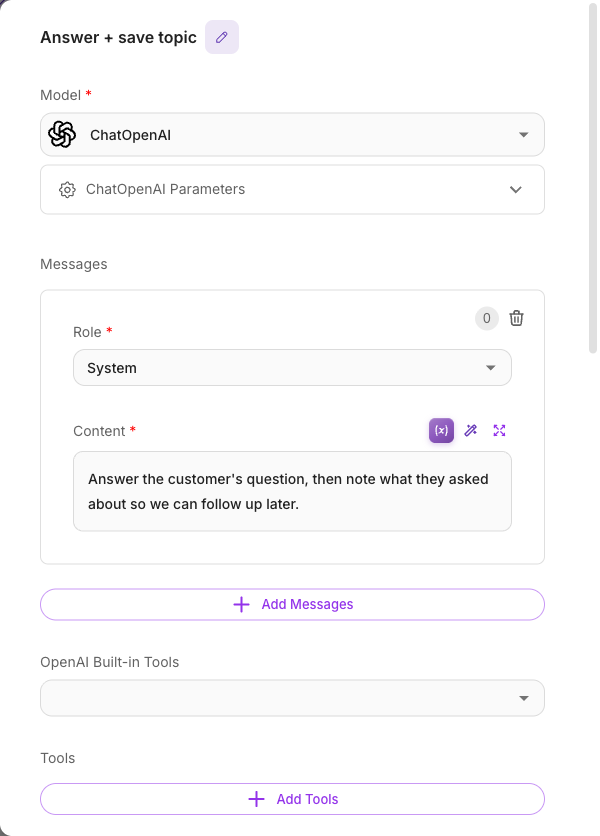
This Agent sends the greeting itself — leave its Show Output in Chat on — so the visitor gets an immediate response before the pause. It needs no Direct Reply of its own; adding one that repeats the same text would send the greeting twice. See Show Output in Chat.
Step 3 — Add the Wait node
Add a Wait node after the greeting and connect them. The Wait node pauses the flow for a duration you choose.
- Wait Duration — set how long to pause (for example, 5 minutes). The duration supports up to
24:59:59.
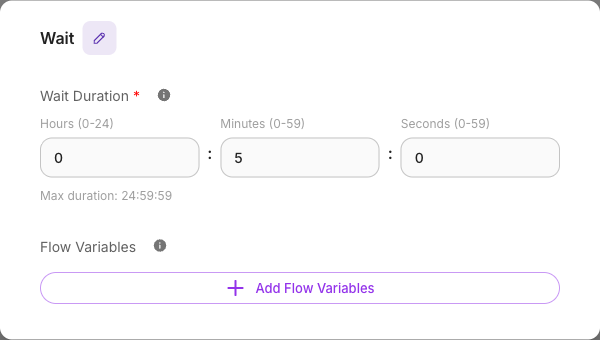
The Wait node has its own Flow Variables section that updates state after the wait completes — handy for marking a stage like followup_sent. Values you set here take effect when the flow resumes.
Step 4 — Send the personalized follow-up
After the Wait, add a second Agent — call it Follow up — that references the state you saved earlier:
The visitor was interested in
{{$flow.state.topic}}. Write a short, friendly follow-up nudging them to continue, and include a small incentive.
Because topic was persisted, it's still available minutes later. Finish with a Direct Reply whose Message is that Agent's label:
{{ Follow up }}
This Agent does get a Direct Reply, so turn its Show Output in Chat off — otherwise the follow-up goes out twice.
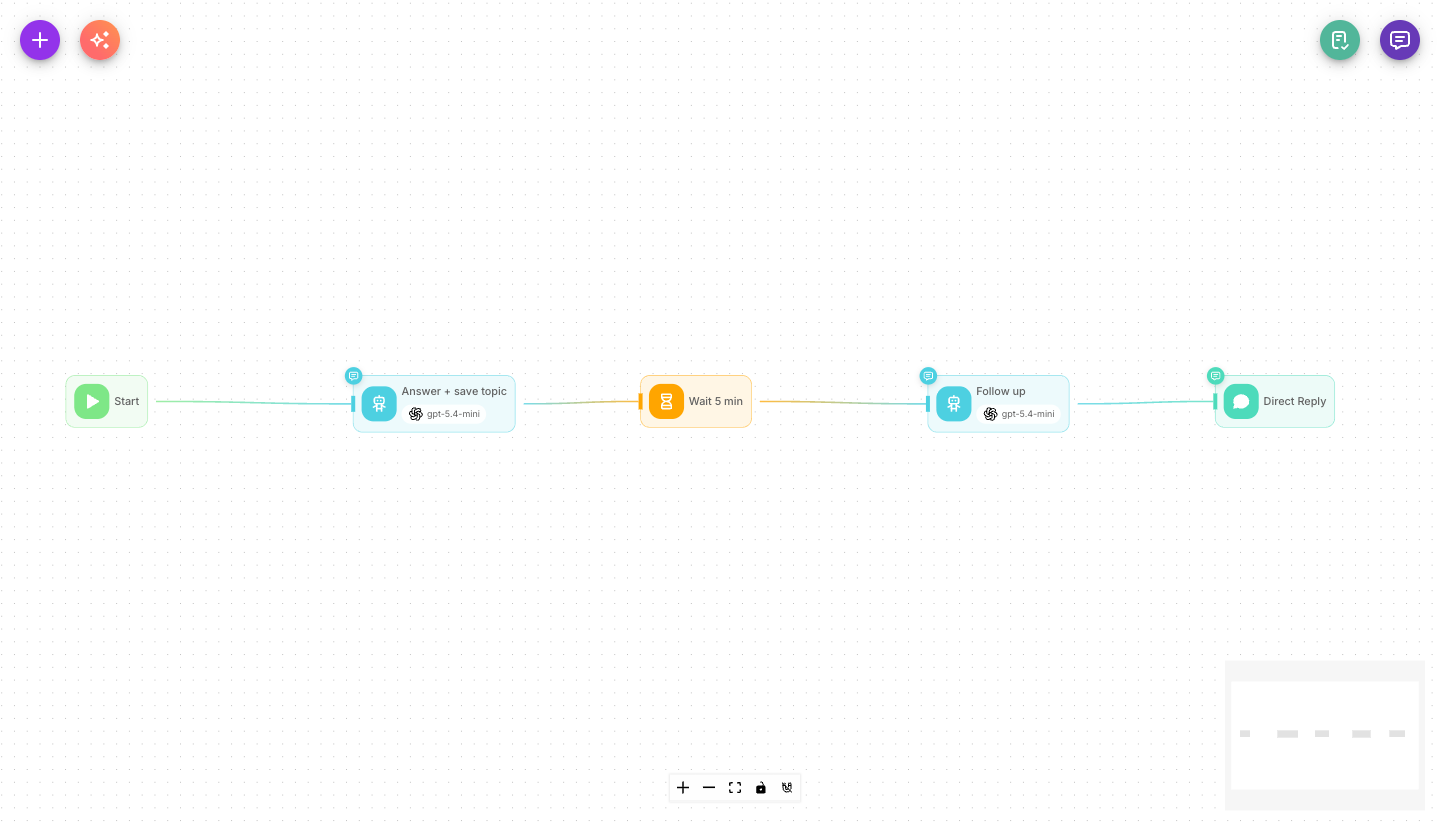
Your finished graph: Start → Answer + save topic → Wait 5 min → Follow up → Direct Reply.
Step 5 — Test it
Save and open the chat tester. Send a message, receive the greeting, then wait out the duration (use a short one like 1 minute for testing). When the timer elapses, the follow-up arrives, referencing the topic you mentioned earlier.
You can watch the pause and resume in Executions.
What you learned
- The Wait node pauses a flow for a set duration (up to
24:59:59). - Saving context to flow state with Persist Variables on keeps it available after the pause.
- The Wait node's own Flow Variables update state after the wait completes.
- The follow-up Agent personalizes its message by reading
{{$flow.state.<key>}}.
Next steps
- Capture more than one detail to follow up on: Lead collector bot.
- Branch the follow-up based on what was captured: Conditional routing.
- Understand persistence in depth: Flow state and Memory.