Activity Tab
Where the Overview tab aggregates, the Activity tab lists. Two sortable tables — one per conversation, one per run — and a path from either into the full execution trace.
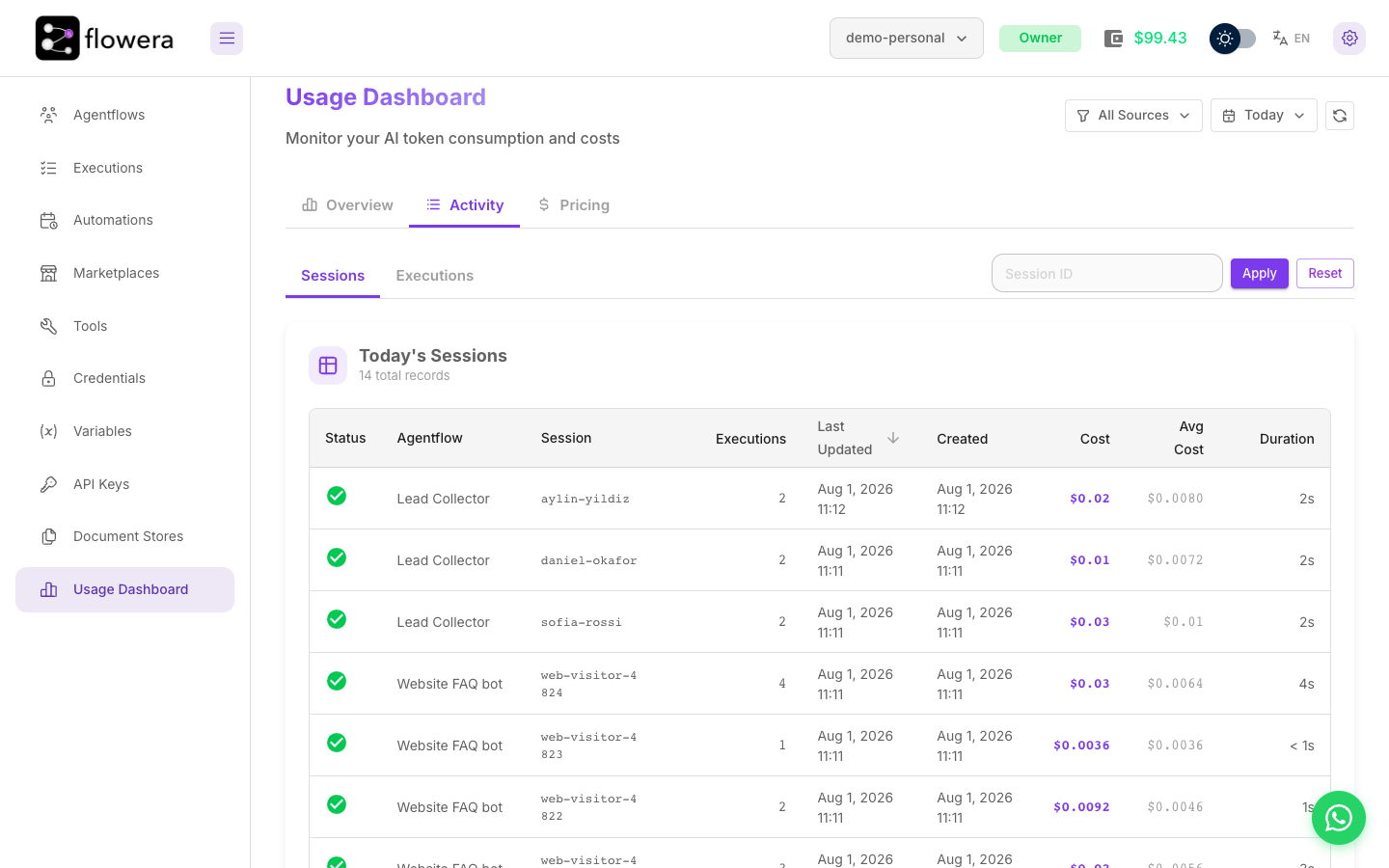
Sessions and executions
| Sub-tab | One row is | Use it to |
|---|---|---|
| Sessions | One conversation with one flow | Find the expensive customer |
| Executions | One individual run | Find the expensive message |
A session usually contains several executions — one per message the customer sent. When a conversation calls a sub-flow with Execute Flow, each flow appears as its own row, so you can see what the sub-flow cost separately.
Session columns
| Column | Meaning |
|---|---|
| Status | The state of the most recent execution in the session — green for success, red for error |
| Agentflow | Which flow. Deleted flows still appear, marked as deleted |
| Session | The session ID, truncated, with click-to-copy |
| Exec count | How many runs the conversation contained |
| Total cost | Everything the conversation cost |
| Avg exec cost | Total divided by the count |
| Duration | Between the first and last execution |
| Created / Last execution | When it started and when it last did anything |
Sorted by last activity, newest first. Sort by Total cost instead and the outliers surface immediately — that's the usual first move.
Exec count deserves attention. A conversation with 40 executions is either a very engaged customer or a loop, and the difference is worth checking.
Execution columns
| Column | Meaning |
|---|---|
| Status | Success, error, timeout, or stopped |
| Agentflow | Which flow ran |
| Session | The conversation it belonged to |
| Created / Last updated | When it started and finished |
| Cost | What this single run cost. The info icon beside it opens the cost breakdown |
Sortable by cost, which is the fastest way to the single most expensive run in a period.
The cost breakdown splits a run's cost by kind: input and output tokens, voice, request, Node Fees — the fixed fees of every non-AI node and tool in the run, shown when there are any — and Execution Time, which covers the per-second time of AI nodes and paid tools plus the 30-second steps of fixed-fee nodes. The same breakdown appears on the Executions page and in a session's drawer.
Opening a session
Clicking a session row opens a drawer with that session's individual executions. Clicking one of those opens the full execution detail — the node tree and every node's inputs and outputs. The execution detail doesn't show costs; the run's cost breakdown is the info icon in the Cost column.
That's the end of the trail: from a total, to a flow, to a conversation, to a run and the nodes in it. To see which node cost the money, open the flow in the Overview tab's cost distribution, which breaks it down by node.
Copying a session ID
Session IDs are click-to-copy throughout. Useful when you're cross-referencing:
- Paste one into View Messages to read what the customer actually said.
- Paste it into the Executions filter to see every run in the conversation, including ones with no cost.
A note on document stores
Embedding operations from document stores aren't listed here. They're not conversations, so they'd have no meaningful session; their cost is on the Overview tab under the Document Stores source filter.
Related
- Overview tab — the aggregates these rows add up to
- Executions — the full trace behind a run
- View Messages — the customer's side of a session