Document Stores
A document store is a named collection of content that flows can search. One store per body of knowledge: a product manual, a policy handbook, a support archive.
What a document store is
A store is three things layered together:
- Loaders — where the content comes from, and how it's split.
- Chunks — the passages the loaders produced.
- A vector index — the searchable form of those chunks.
The store holds all three, and the Retriever node searches it by name. Change the underlying documents and every flow using the store picks up the new content — no flow edits.
Creating a store
On the Document Stores page, press Add New, then give the store a name and a description.
Name it after the knowledge, not the file: Refund policy, not doc_v3_final.pdf. When an Agent has several stores available, the name is how it decides which to search.
The description matters for the same reason. Write what's inside and when to use it.
What a store looks like inside
Open a store and you see its loaders, each with the splitter it uses, the source it came from, and how many chunks and characters it produced.
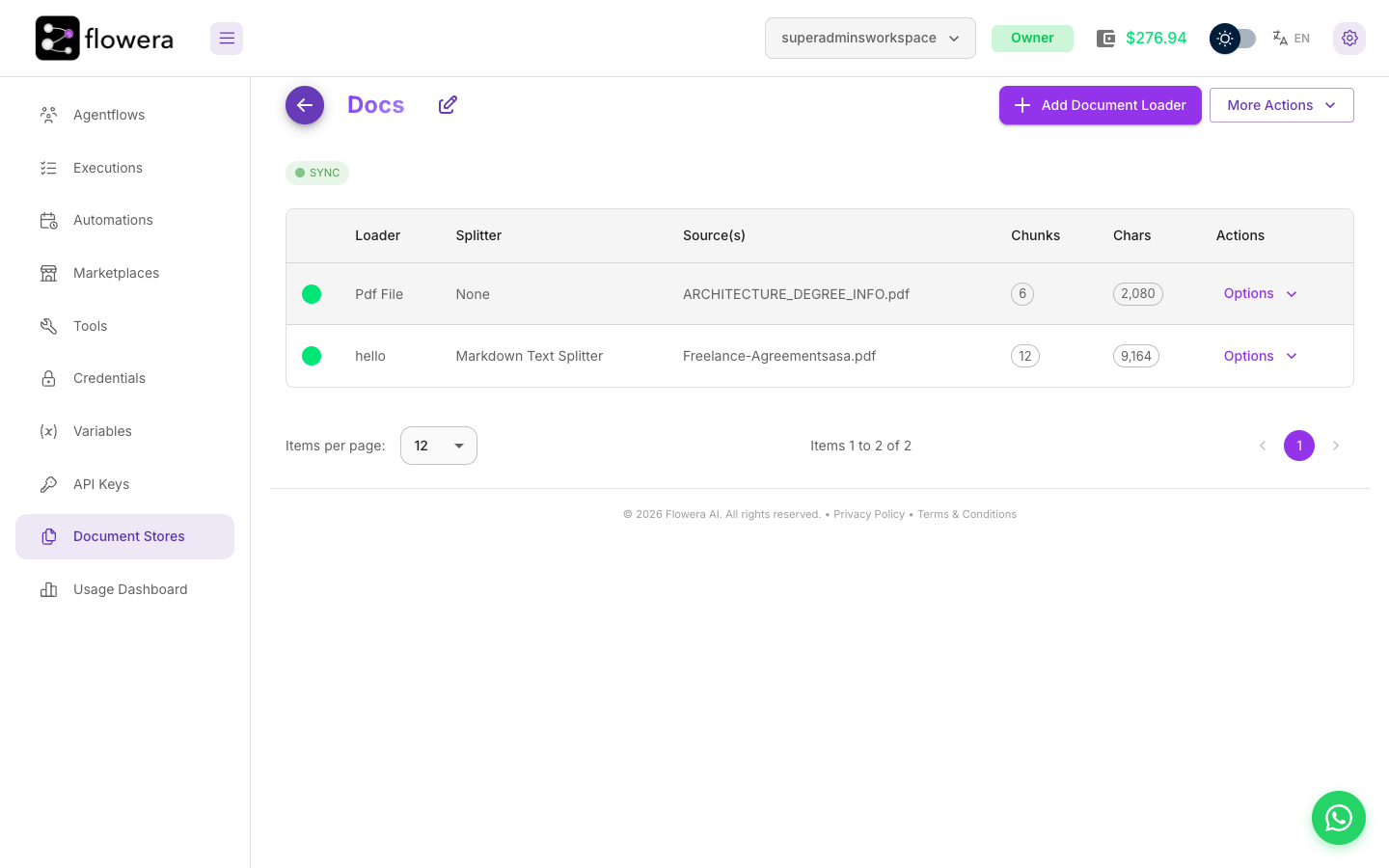
From here: Add Document Loader brings in more content, and More Actions holds the store's management options — View & Edit Chunks, Upsert All Chunks, Retrieval Query, Refresh, and Delete.
Two things live elsewhere: View Upsert History is a history icon inside the Upsert All Chunks screen, and the Upsert API details are on an individual loader row's Options → View API.
Store status
The badge on the store tells you whether it's ready to be searched:
| Status | Meaning | What to do |
|---|---|---|
| Empty | No content yet | Add a document loader |
| Stale | At least one loader is still processing its files | Wait, then Refresh |
| Syncing | Loaders are being processed right now | Wait |
| Sync | Every loader is processed — chunks are ready, but not yet indexed | Run Upsert All Chunks |
| Upserting | Chunks are being embedded and indexed | Wait — a large store takes minutes |
| Upserted | Indexed and searchable | Nothing. This is the healthy state |
The two that get confused are Sync and Upserted. Sync only means the files finished processing; the content is not in the vector store yet, and a Retriever pointed at the store finds nothing. Upserted is the searchable state, and it's the only one where Retrieval Query is selectable — if that menu item is greyed out, the store hasn't been upserted.
Stale is about processing, not about the index: a loader hasn't finished, so the store's chunk counts are incomplete. Refresh, wait for Sync, then upsert.
Adding a loader or editing chunks changes the content but not the vector store, and it doesn't move the badge back either. A flow keeps answering from the previously indexed version until you run Upsert All Chunks again. If a bot is quoting a policy you updated last week, upsert first.
Editing and deleting a store
Rename a store or change its description from the store's own header. Both are safe: flows reference the store by its identity, not its name.
Deleting is not safe. It removes the chunks and the index, and every Retriever pointing at the store starts returning nothing — usually without an obvious error, because a retrieval that finds no passages isn't a failure. The flow just answers worse.
Before deleting, search your flows for the store's name. If a Retriever uses it, repoint the node first.
Related
- Document loaders — getting content into the store
- Vector store — embeddings, indexing, and what "upsert" means
- Retriever node — searching the store from a flow